rblxtool
Simple on the outside, deep underneath. Most of it needs no Roblox account: profile anyone, search the whole catalogue and creator store, trace the friend chain linking two players, and extract real geometry, clothing templates and audio in formats you can open in Blender or upload again. Sign in and it will also buy someone's entire outfit for you, price shown up front.
Download
Screenshots
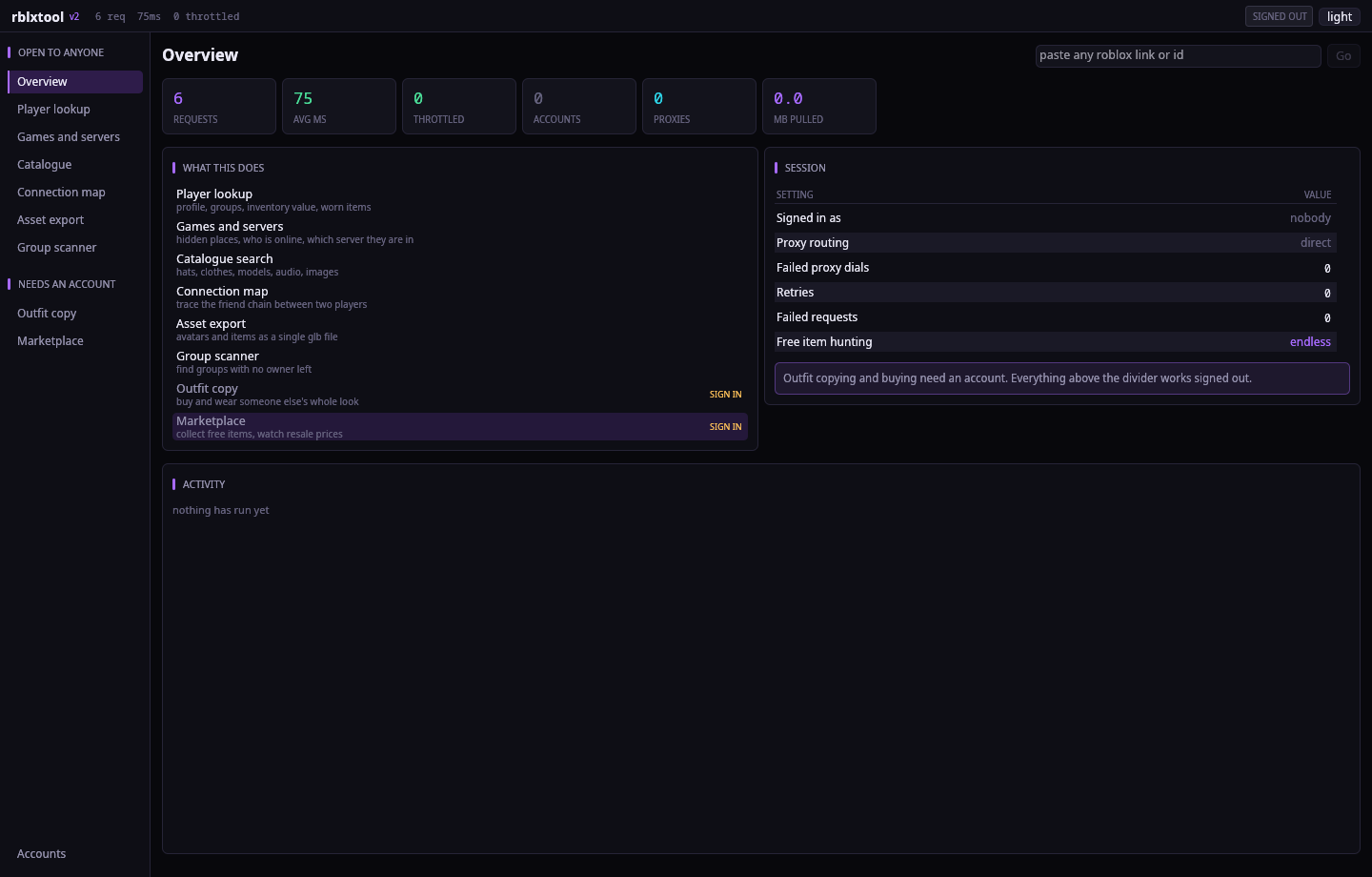
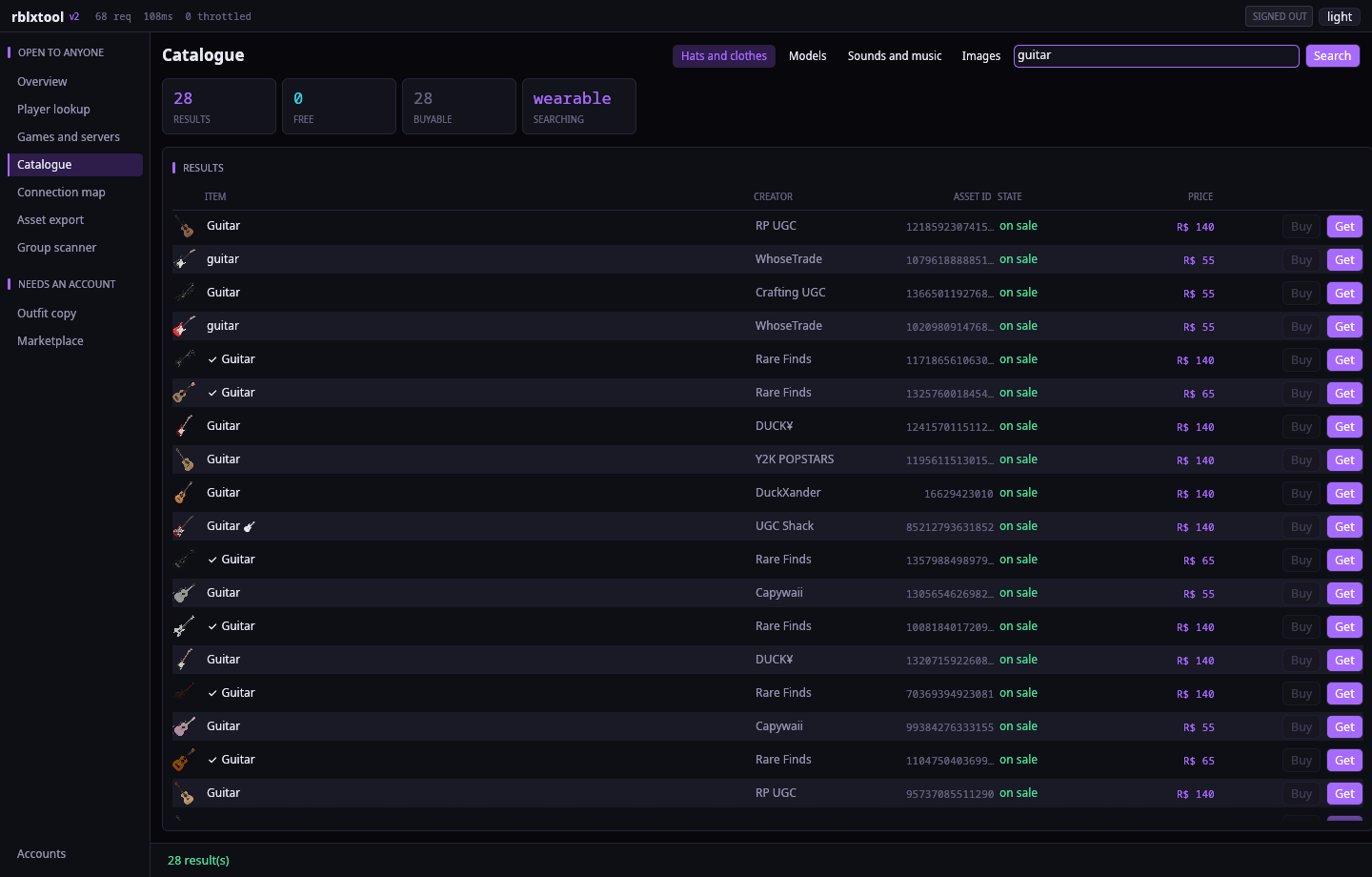
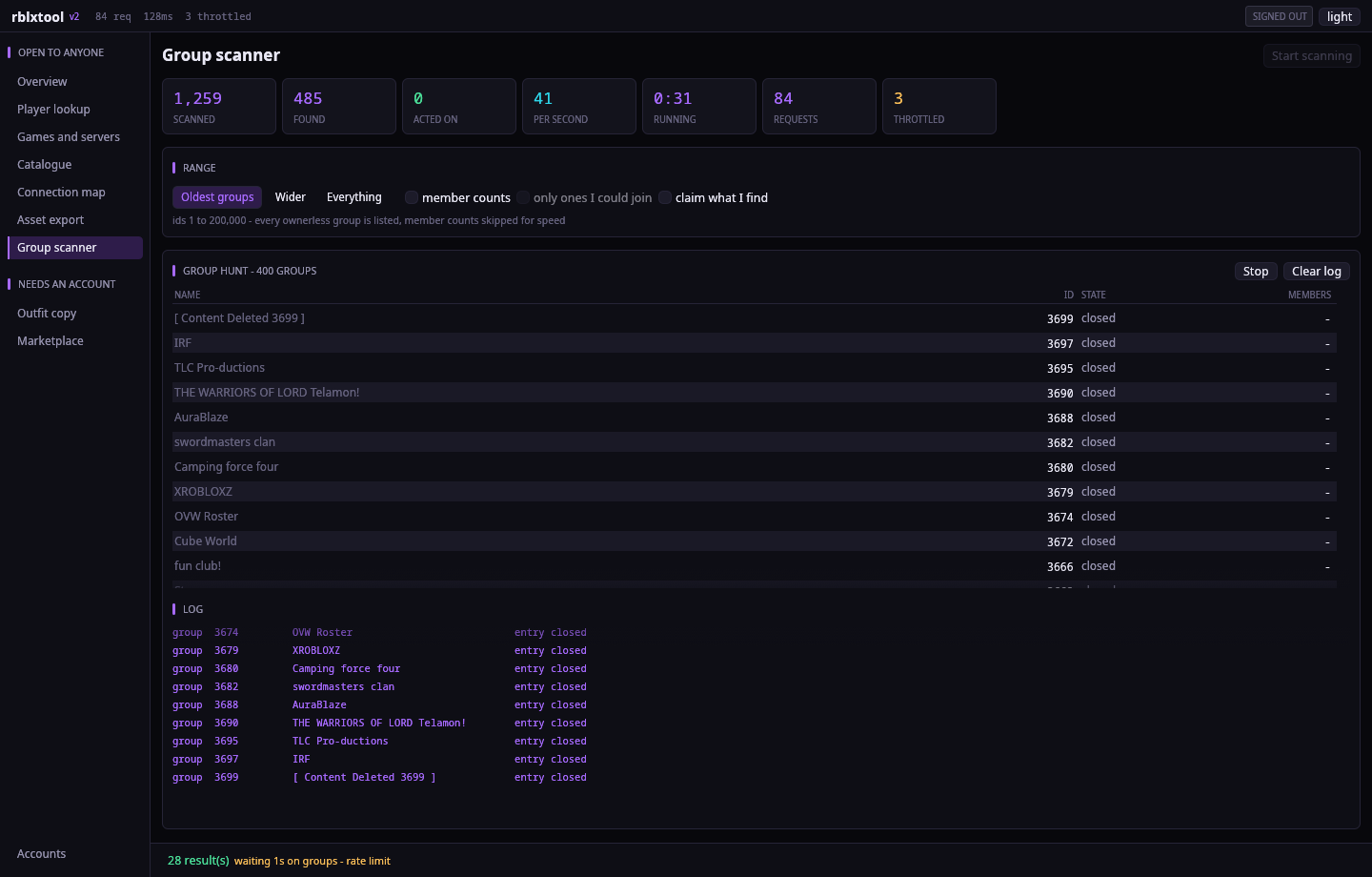
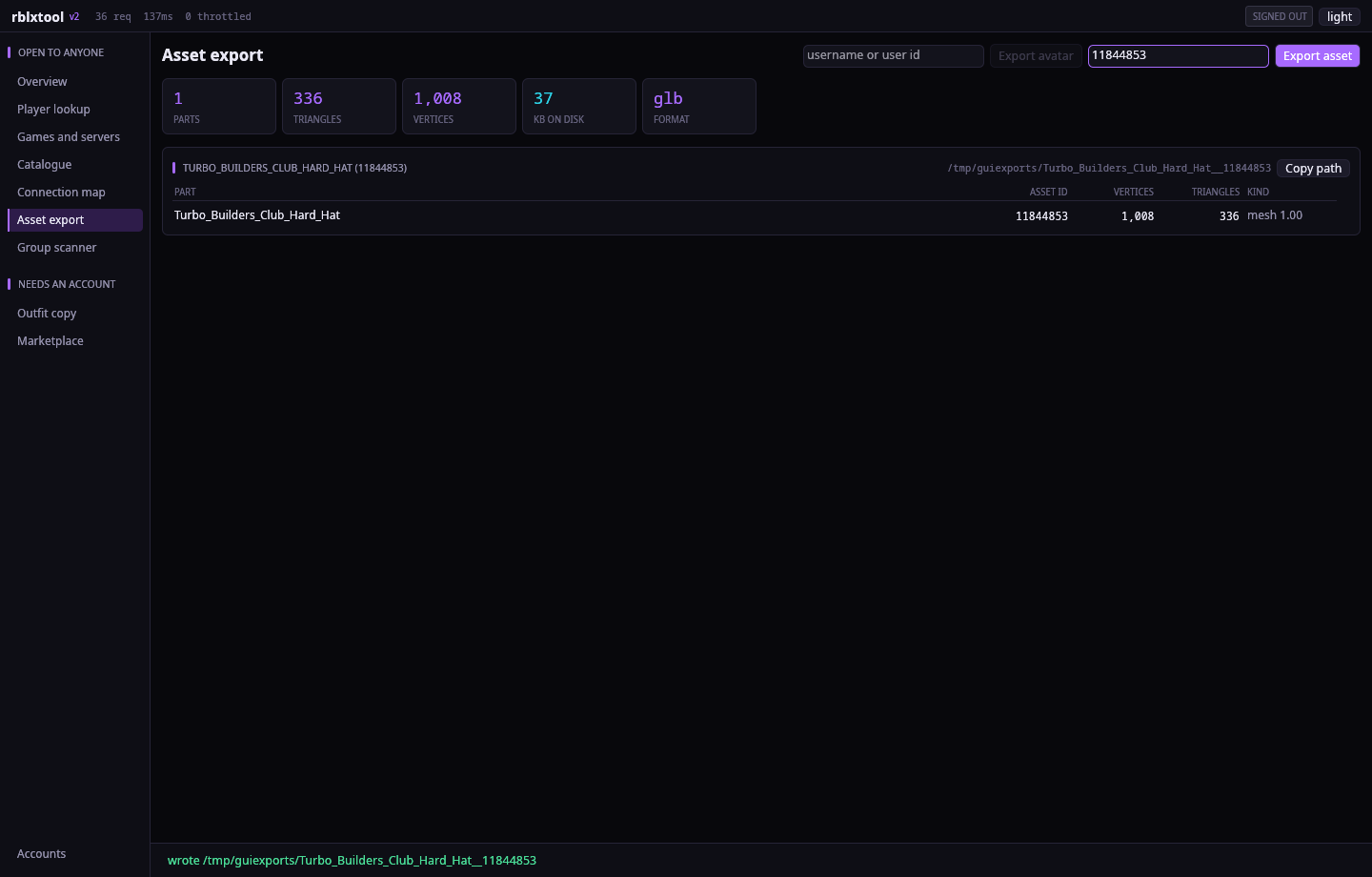
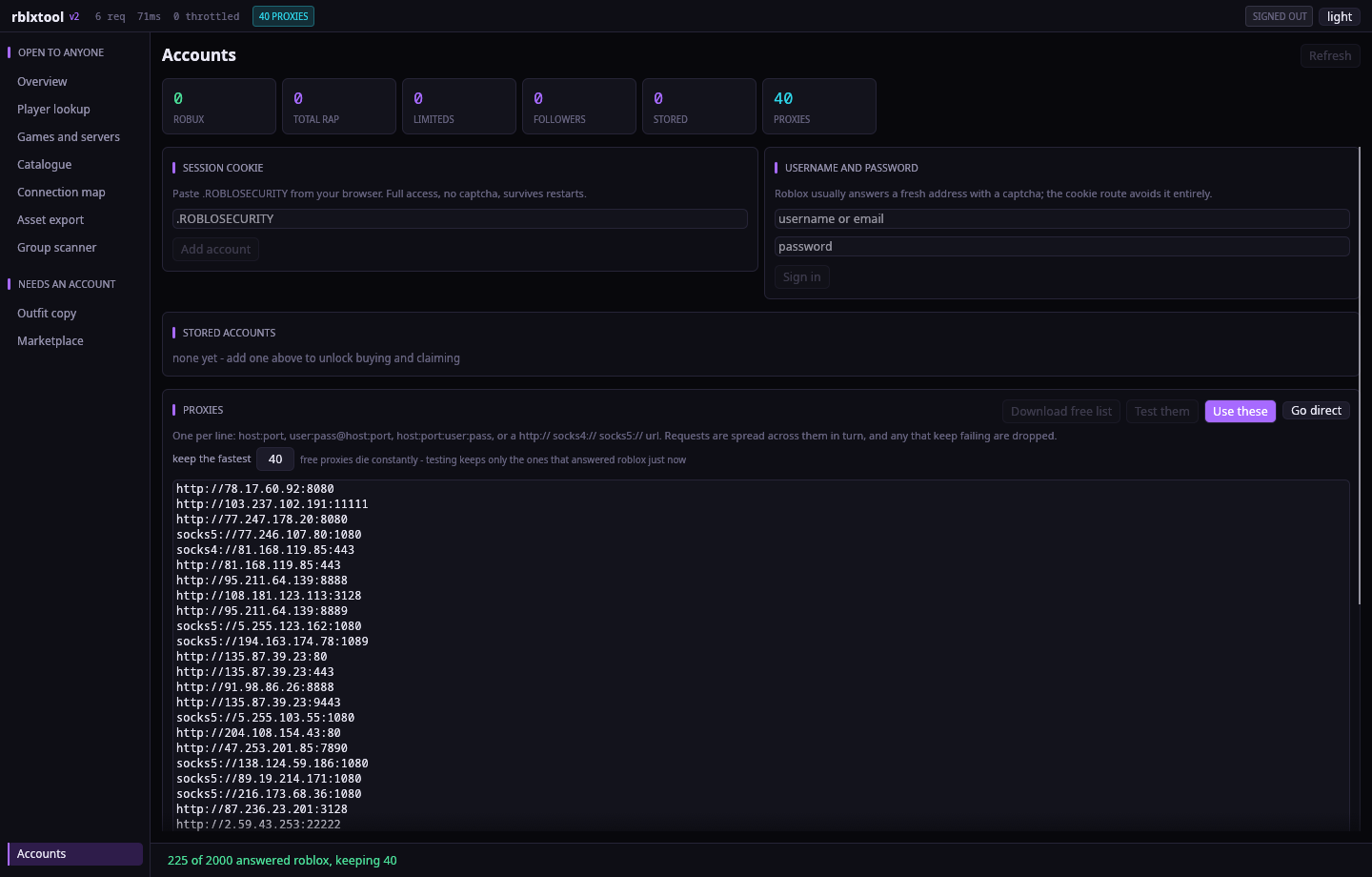
The interface
It reads like a data dashboard rather than a set of cards. Navigation is a narrow left rail split into open to anyone and needs an account, so it is obvious what works signed out before you click anything. The type is Noto Sans, and the palette is near black with a neon violet accent, the density is deliberately tight, and every figure on screen is set in a monospaced face so columns of numbers line up.
Every page follows the same shape: a title with its actions on the right, a row of live counters, then real tables. Rows are 21 to 30 pixels, zebra striped, with numeric columns right aligned and long names ellipsised rather than wrapped. Counters animate up to their value, disabled buttons say why they are disabled when you hover them, and the status bar stays up for as long as a job is running instead of fading out and leaving you guessing.
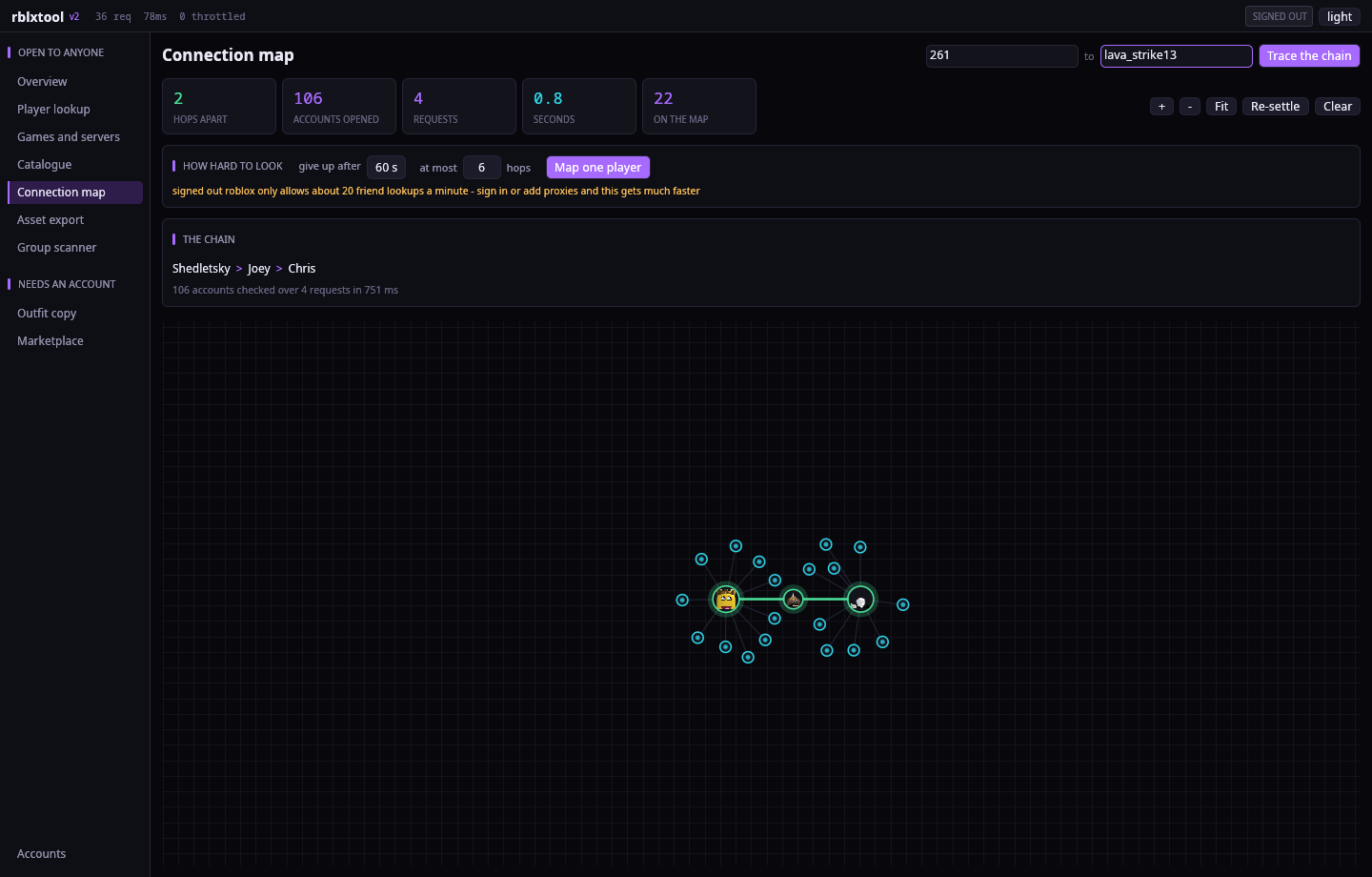
The connection map keeps its own canvas: node circles scale with how connected someone is, avatars only draw once you have zoomed in far enough to see them, scrolling zooms toward the cursor, and there are explicit zoom, fit and re-settle controls.
Games, hidden places and servers
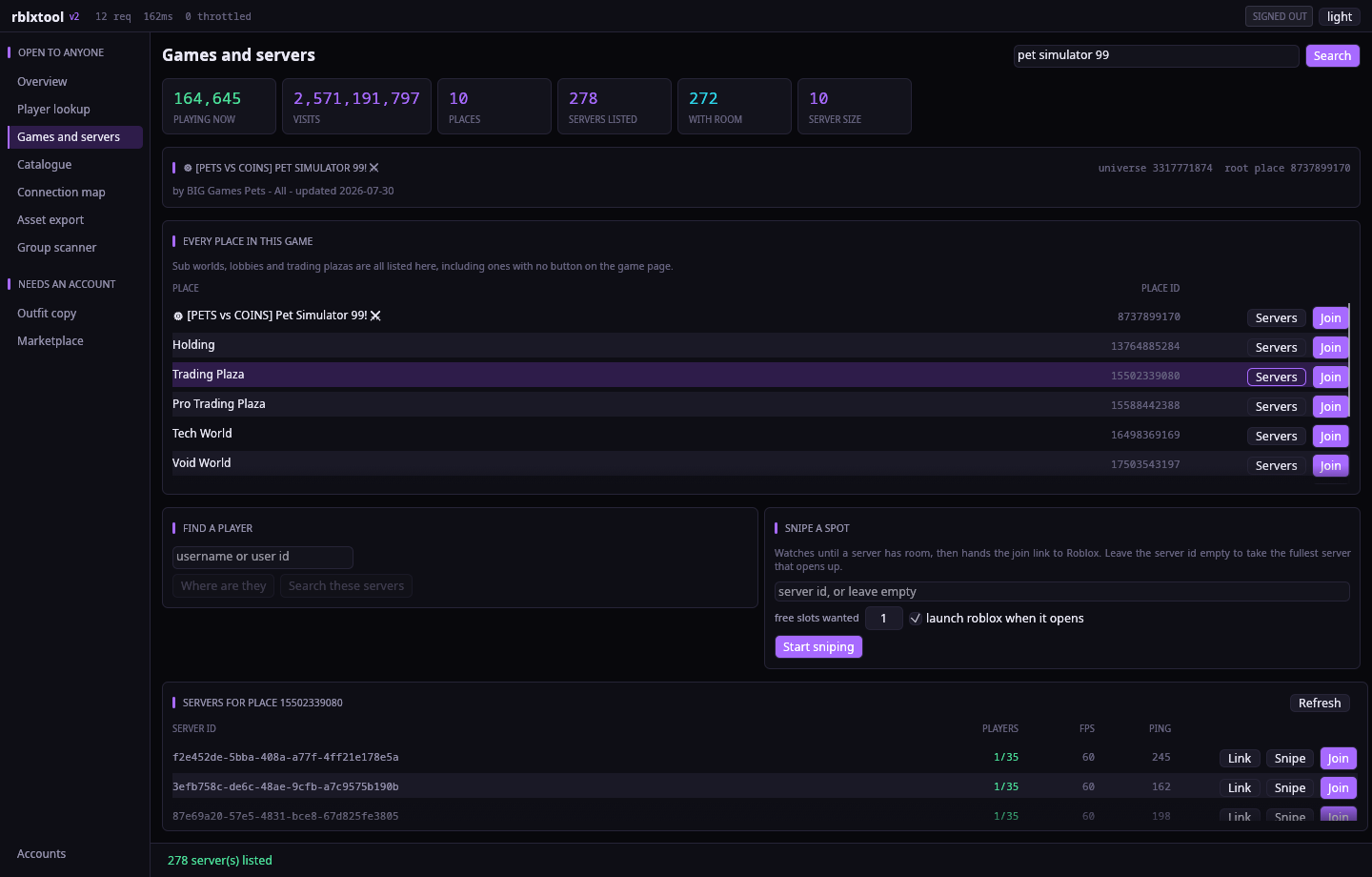
Search a game by name, or paste any link, place id or universe id. Then it lists every place that game owns - not just the one with a play button. Blox Fruits comes back with its Second Sea, Third Sea, Dungeons and every event place; Pet Simulator 99 comes back with the Trading Plaza, the Pro Trading Plaza, Tech World, Void World and a place the developers called TESTING. Each one has a join button and its exact place id.
- Every running server for a place, with player count, FPS, ping, the exact server id and a copyable
roblox://join link. - Where is this player - online, in studio, or in a game, and if their joins are public, a button that drops you into their exact server.
- Find them anyway. If their joins are private, point it at a place and it walks every server, resolving the hashed player thumbnails Roblox still exposes and matching them against the face of the account you named.
- Snipe a spot. Pick a full server, or none at all, and it polls until there is room and then hands the join link straight to Roblox.
Working out who someone is
Four tools that all answer the same kind of question: who is this, and who are they connected to.
- Alt finder. Point it at an account and it scores every candidate 0-100% on weight of evidence: friends in common (as a share of the smaller list), whether they friend each other, how close together the accounts were made, username similarity after stripping trailing digits, matching display names, groups in common - weighted by how small the group is, since two people sharing a ten member group means far more than sharing a million member one - and identical worn items. Every match shows its signals and their points, and says what it could not see, so a 20% built only on a similar name reads differently from 20% with everything public. It is a weight of evidence, not proof, and it says so.
- What an account is worth. Every collectible with its RAP and today's cheapest asking price, totals for both, the average item, the top holdings, and a CSV export.
- Compare two players. Age, friends, followers, groups, body type, collectibles and RAP lined up side by side with matching values highlighted - plus every friend they share and every group they are both in, smallest group first.
- Mutual friends on its own, for when that is all you wanted.
Copy anyone's look
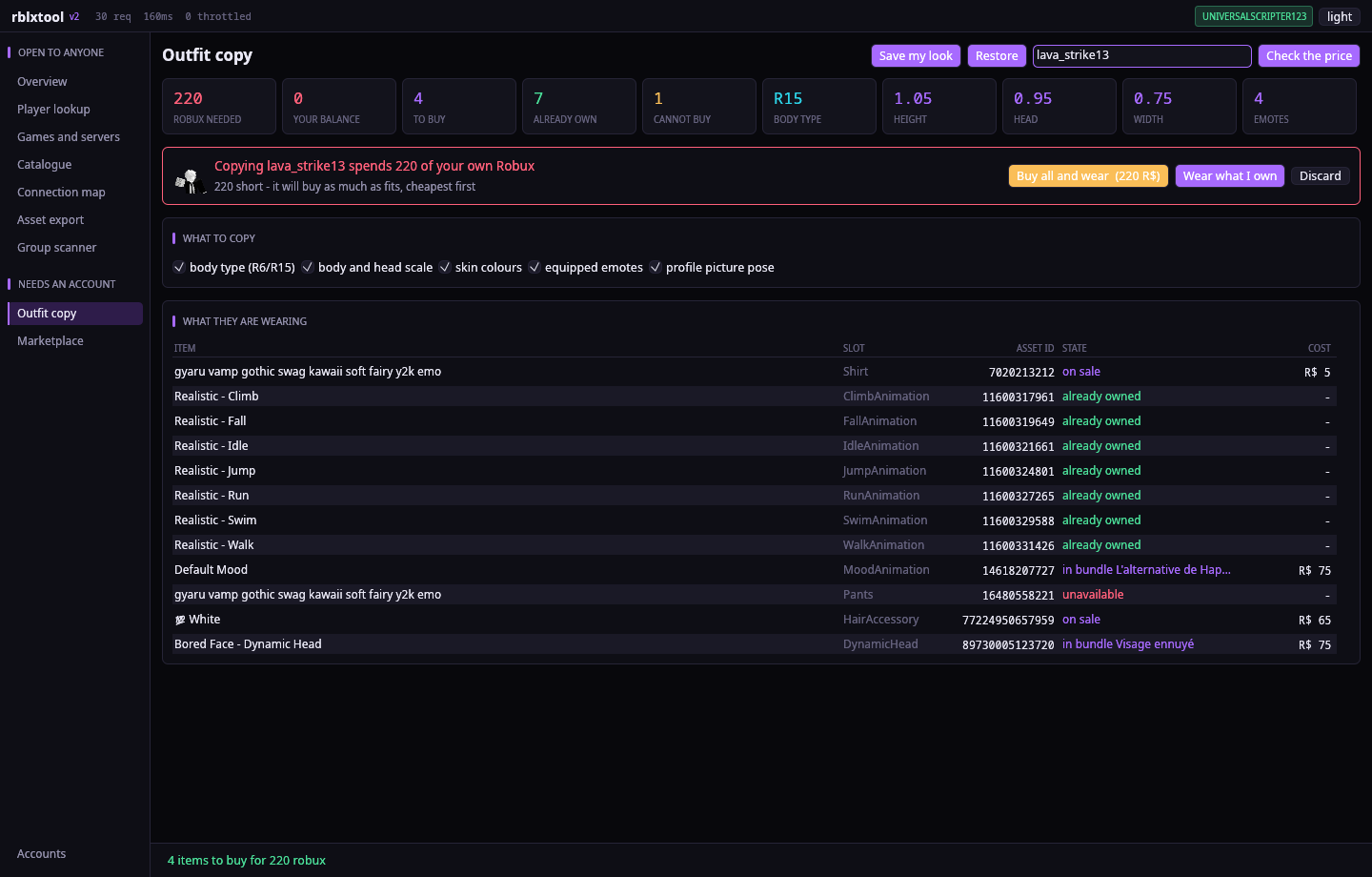
Point it at a player and it works out every item they are wearing, checks what you already own, prices the rest, and tells you the exact total before anything happens.
- Handles items sold on their own, items only sold inside a bundle, and limiteds that are resale only, picking the cheapest listing.
- Matches their skin colours, body and head scale, R6 or R15 body type and equipped emotes, not just the clothes. Colours come from the exact hex values where Roblox exposes them rather than the nearest classic colour, and scales are applied after the items go on, because Roblox re-clamps them whenever the body parts change.
- Layered clothing keeps its order. The v2 avatar endpoint carries a
metablock per item with its layer order and puffiness; that is read, sorted and sent back, so a shirt that sits over a jacket still sits over it. - Optionally poses your profile picture with the first emote they have equipped. Roblox does not publish anyone else's camera angle, so the pose is matched, not the exact framing.
- Off sale items are listed as impossible rather than silently skipped.
- Save your own look first and one button puts it back exactly as it was.
Verified on a real account. Buying works end to end (a free collectible bought, then correctly reported as already owned on a second run). Copying lava_strike13 reproduced all six scale values exactly - height 1.05, width 0.75, head 0.95, depth 0.88, proportion 1.0, body type 0.2 - and the profile picture pose landed with their emote on the headshot. copy save then copy restore put the original ten items and default scales back.
Simple on the outside
There is no settings maze. The first screen asks what you want to do in plain words and every job runs on sensible defaults, so worker counts, search budgets and batch sizes never appear. All of that power is still there, exposed through the command line build for anyone who wants to drive it precisely.
There is also a single box that takes any Roblox link or id — a profile, an item, a bundle, a group — and works out what it is and where to send you.
Finding how two players are linked
The old search walked outward from one name only, one request at a time, and gave up after 400 accounts - which is barely past the first hop. It could not find a friend of a friend of a friend.
It now searches from both names at once and stops the moment the two sides meet. That is the whole trick: finding a six hop chain one-directionally means opening something like 505 accounts, while meeting in the middle costs about 2 × 503. Twenty-four friend lists are fetched at a time, whichever side is currently smaller gets expanded next, and there is no cap on how many accounts it will open - just a time budget you set.
- Shedletsky to a random player: 2 hops, 4 requests, 0.8 seconds.
- The budget is honoured to the millisecond - in-flight requests are raced against the deadline rather than awaited blindly, so Stop and the timer both bite immediately.
- If one person's friends list is private the search says so by name, instead of silently finding nothing.
- The map draws the chain plus about ten people around each link, laid out as a line, rather than dumping every account it opened into a hairball. Names that came back blank are backfilled in one batch.
- Signed out, Roblox allows roughly 20 friend lookups a minute and the page says so. Signed in, or with proxies, it is far faster - and since rate limits are now counted per proxy, a pool multiplies it.
Fast, and it does not stop
- A full profile lands in about 0.6 seconds. It used to walk eleven endpoints one after another; now every one of them is fired at once. They live on different Roblox hosts with separate rate limit buckets, so the round trips overlap almost perfectly.
- Connections to the busiest hosts are opened the moment the app starts, so the first search does not pay for a TLS handshake. Average request latency sits near 30 ms once warm.
- Ownership checks, asset children and thumbnail batches are all fetched in parallel too.
- Endless hunting. The free item sweep no longer stops when it reaches the end of the catalogue: it waits, then sweeps again, so a new free release gets picked up whenever it appears. Leave it running.
No account needed
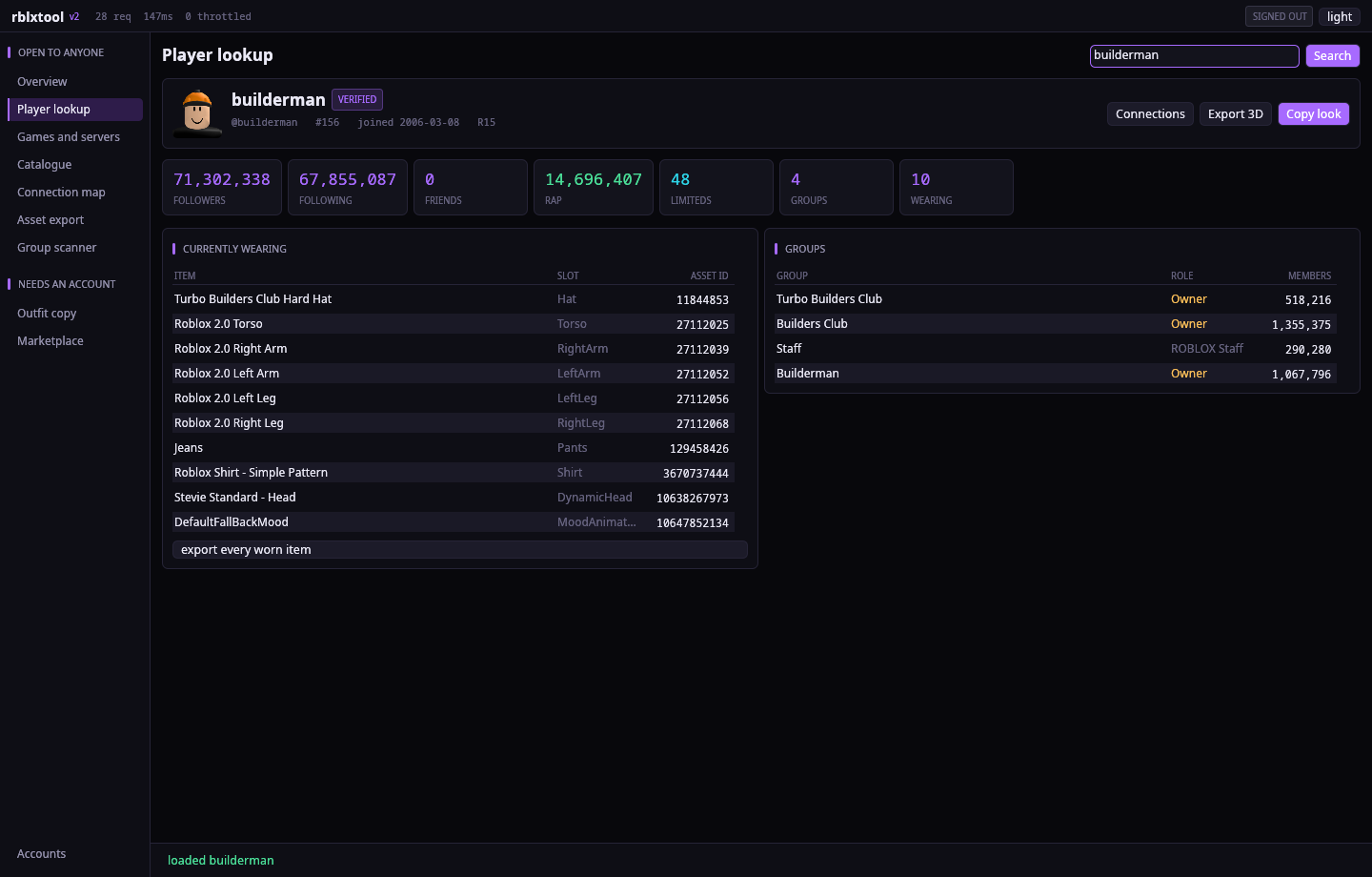
- Person - profile, join date, former usernames, follower and friend counts, every group and rank, published places, inventory value and RAP, and exactly what they are wearing right now.
- Connection map - give it two players and it finds how they are linked. See below.
- 3D export - avatars, bundles, accessories, models, decals, shirts, pants and audio, pulled straight out of the asset delivery API and written as files you can actually use.
What comes out of the extractor
A whole avatar now comes out exactly as Roblox renders it. Roblox will hand a signed in account the assembled avatar - every body part, accessory, layered garment and face texture already in its right place - so that is what an avatar export uses. Hand-assembling parts from their individual meshes could never get the attachment maths perfectly right; this sidesteps it. A test avatar came out as 16 parts and 9,953 triangles, feet on the floor at y=0, hair sitting on the head, arms at ±1.5 studs. Without an account it falls back to the old per-item assembly and says so.
An export is one file: meshes, materials and textures packed into a single glTF binary (.glb), which Blender, Studio, Unity, Godot and Windows' own 3D viewer all open directly.
- Every Roblox mesh generation is parsed for single item exports:
1.00ASCII, binary2.00/3.00, and the modern4.00/5.00format current UGC uses, including skinned meshes where the bone envelope sits between the vertices and the faces. - Shirts and pants come out as the 585x559 template, the exact image the upload form wants.
- Audio comes out as the original Ogg Vorbis or MP3.
- Assets Roblox will only hand to a signed in account now say exactly that, instead of the old and useless no download location.
- Pass
--format objfor Wavefront OBJ with a separate MTL and textures.
Where the walls actually are
Measured, not guessed:
- Asset delivery answers anonymously for accessories, bundle parts, clothing templates and plenty of audio. Most Model assets return 401 and need a signed in session - add an account and they open up. This is an access rule, not a format problem.
- Multi part models export every mesh they contain, but the part transforms live in the binary
rbxmcontainer, so the pieces arrive as separate objects rather than pre-assembled. - Unauthenticated rate limits from a datacenter address: catalog search 1 request per 60 s, friends 20 per 60 s, group batch 1 per second for 100 ids. The limiter reads the quota headers and retunes itself rather than guessing.
Needs an account
- Free sweep - walks every catalog category in parallel, batches 120 items per detail call, buys everything at zero you do not already own.
- Limited sniper - polls reseller listings and buys the moment one drops under an absolute ceiling or a fraction of recent average price.
- Ownerless group hunter - sweeps ids a hundred per request, keeps the ones with no owner, can join and claim. Scanning works anonymously; claiming does not.
Sign in with a session cookie, or with username, password and 2FA. Accounts are kept in an AES-256-GCM vault keyed with Argon2id.
Proxies and rate limits
Paste a list on the Accounts page - host:port, user:pass@host:port, host:port:user:pass, or a http://, socks4:// or socks5:// url - or press Download free list and it pulls ~2,000 from ProxyScrape in one go.
Free proxies are mostly dead, so there is a Test them pass: every candidate gets a real TLS request to Roblox through it, not just a TCP connect, because plenty of them accept a tunnel and then relay nothing. A recent run: 2,000 downloaded, 225 answered Roblox, fastest 40 kept, in about a minute. Whatever survives is saved, put straight into rotation and reloaded next launch.
- HTTP
CONNECT, SOCKS5 (with username/password auth) and SOCKS4/4a are all spoken natively - no proxy crate, just the handshakes. - Requests round-robin across the pool, and any proxy that fails twice is dropped from rotation automatically, so a list rots gracefully instead of breaking everything.
- The command line has the same thing:
rblxtool proxy fetch --test --keep 40.
Underneath, the limiter reads Roblox's own x-ratelimit-limit headers and retunes each host's bucket to the quota it was actually granted rather than guessing. When a job is waiting out a backoff the status bar says which host and for how long, instead of looking frozen.
One codebase, two builds
The interface is drawn by the program itself with egui, so there is no GTK, Qt or web view anywhere and it looks identical on every platform. Pick which build you want at compile time:
cargo build --release --features guigives the desktop applicationcargo build --release --no-default-features --features cligives the command line client
The download below is the graphical build for Windows and the command line build for Linux. macOS builds from the same source with a plain cargo build --release.
Stopping things, and per proxy limits
Stop actually stops. Every job now hands back its task handle, and Stop cancels the token and aborts the task, including the hundreds of sub-tasks a proxy test or a group scan spawns. Measured: a running scan at 12 requests, Stop pressed at 13, still 13 fifteen seconds later.
Rate limits are counted per proxy, not globally. One proxy getting throttled used to slow everything down, which was the whole point of having a pool. Each request now pins a specific proxy before it is sent, and the token bucket is keyed on host + proxy, so forty proxies means forty independent quotas. Connection reuse is turned off while proxies are on, otherwise a pooled connection would quietly egress through a different proxy than the one that was billed.
Source
Browse the whole tree in the reader below, or take the archive above.